> ## Knowledge Base Index
> Fetch the complete knowledge base index at: https://lai.crisp.help/sitemap.xml
> Use this file to discover available pages before exploring further.
> Pure-Markdown content can be obtained by appending a '.md' suffix to the content URLs listed in the sitemap (without the trailing slash).

# Advanced widgets


> A list of layouts to show your favorite reviews on different pages.

|| The four following widgets are under the **LAI Reviews Widget** section on the Shopify theme editor.
|| ![](https://storage.crisp.chat/users/helpdesk/website/e1f7f04a48c48800/scrnli11820249-15-30-am_166gkdf.png)

## Advanced widgets include:

1. **Card carousel**: Display reviews in a slider with multiple arrangements. Reviews including both photos and text are acceptable to show with this layout.

2. **Card grid**: Show selected reviews on your favorite pages. Reviews including both photos and text are acceptable to show with this layout.

3. **Testimonial carousel**: Showcase review content only with a minimal layout. Only text of reviews is acceptable to show with this layout.

4. **Media gallery**: Present your most artsy pictures to catch your customers' eyes. Only photos of reviews are acceptable to show with this layout.

|| LAI embed blocks is required to be enabled to show product review section. Click [here](https://lai.crisp.help/en/article/integrate-lai-product-reviews-with-your-themes-1qcoiev/?bust=1705651864711#2-step-1-enable-lai-embed-blocks) on how to enable LAI embed blocks.
|| 
## How to set up advanced widgets on 2.0 themes


### On Shopify Theme editor

#### Step 1: Add **LAI Reviews Widget** section

- On the Shopify theme editor, add the **LAI Reviews Widget** section. 

#### Step 2: Set up widget details

##### Select a widget type

- It is required to select your favorite widget to show on any pages that you want. 

![](https://laireviews.io/assets/images/advanced-widget-2-8a8df635226b5adcb45506ef1d4a9e1c.png)

- If there are no reviews which meet the requirements of the specific widget, the sample data will show instead and the widget will not show in your online store. 

##### Select a review source

###### Default review source:

- From the beginning, each widget is assigned to a specific default review source. It means whenever you add a specific widget, reviews of the default review source will show up. 
        
- This default source is set up in LAI Product Reviews. 

- Please go to **Display** > select the widget which is out of 4 including **Card carousel, Card grid, Testimonial carousel or Media gallery** you're working on > click on **Customize** > choose a suitable Collection with your widget. 

![](https://laireviews.io/assets/images/advanced-widget-3-7225caa5aa8528f9acc066546355161a.png)

###### Review collections

- This is an optional choice. If you assign a collection review source to a specific widget on Shopify theme editor, the review list of the collection will replace that of the default review source set in LAI app.

- LAI provides you with 3 review collections where you can select most-liked reviews to show on Advanced widgets. 

- Please go to **Reviews** > **Review collections** > select a collection you want to customize > choose your favorite reviews > **Save** your choice. 

![](https://storage.crisp.chat/users/helpdesk/website/-/e/1/f/7/e1f7f04a48c48800/advanced-widget-4_1wjiwlq.png)

##### Customize layout

- Each widget has its own default settings for colors, weight, etc., but you can customize two elements which are **Background color** and **Review widget width** right on Shopify Theme editor. These customized settings will replace the default settings in our app. 

![](https://laireviews.io/assets/images/advanced-widget-5-3f0015d8fa30c07fa5cc24c5ceb2a6d3.png)

- If you want to show the default settings instead, please tick the option **Apply default layout setting**. 

### In LAI Product Reviews app

- At **Display** section, you can choose one widget to show on your page > click on **Customize** > click on **Add to theme** > a **LAI Reviews widget** will be auto added to your Homepage (You can adjust the position of the added widget on other pages.) > select a widget for **Widget type**.

- For more details on how to set up an advanced widget on Shopify Theme editor, please refer to [this link](https://laireviews.io/docs/settings/widgets/advanced-widgets#step-2-set-up-widget-details). 

- For example, you want to display **Media gallery** widget.

    + Step 1: Please click on **Customize** in Media gallery box.

    ![](https://laireviews.io/assets/images/advanced-widget-6-1b6d14937504541983a3266ff18dfc9d.png)

    + Step 2: Click on **Add to theme** > a **LAI Reviews widget** will be auto added to your Homepage (You can adjust the position of the added widget on other pages.) > please select **Media gallery** for **Widget type**. 

    ![](https://laireviews.io/assets/images/advanced-widget-7-5a8ef8b2d93484584c4825ff70b93639.png)

- **Default review source**: please visit [this link](https://laireviews.io/docs/settings/widgets/advanced-widgets#select-a-review-source) for more details. 

## How to set up advanced widgets on 1.0 themes

- LAI provides you with the code to add and show the specific widget on any pages. 

### How to add LAI Advanced widgets to Home page

- **LAI advanced widgets** block is not available on Home page in 1.0 themes, please follow this guideline to show Advanced widgets on 1.0 themes:

  + **Step 1**: Select a theme where you want to show LAI widgets. Click on **Edit code**.

    ![](https://laireviews.io/assets/images/theme-app-extension-5-8d828776dc4202610eaa3c6020d50f3b.png)

  + **Step 2**: Under **Sections**, click on **Add a new section**:

    ![](https://laireviews.io/assets/images/theme-app-extension-6-3673f5938f3ff7ccebdb75ff2ed83e63.png)

  + **Step 3**:This is a .liquid section. Please name it as **LAI-advanced-widgets**

    ![](https://laireviews.io/assets/images/theme-app-extension-7-ec6de7c664bf361b8aaffc37c5d4c46a.png)

  + **Step 4**: Copy this following piece of code, paste it in the **LAI-advanced-widgets** section and replace all current code > click **Save**:

```
{% assign random_number = section.id  %}<script> var sectionConfig=  (typeof sectionConfig == "undefined" || sectionConfig == null) ? {} : sectionConfig; var scmCustomData=  (typeof scmCustomData == "undefined" || scmCustomData == null) ? {} : scmCustomData;var scmCustomDataWigetAll= (typeof scmCustomDataWigetAll == "undefined" || scmCustomDataWigetAll == null) ? [] : scmCustomDataWigetAll;scmCustomDataWigetAll['{{ random_number }}'] ={"id_iframe" : "{{ random_number }}", "productId" : "", "typePage" : 'homePage',"sectionConfig" : JSON.stringify(sectionConfig),"scmCustomData" : JSON.stringify(scmCustomData),'dataProduct' : []};sectionConfig= null;scmCustomData= null;</script>
    <div class="scm-container" style="display: none;">
    <div class="lai-title">{{ section.settings.title }}</div>
    <div class="scm-reviews-importer">
        <iframe class="scm-reviews-importer-iframe" width="100%" title="Sma reviews section Home Page" data-idIframe="{{ random_number }}" data-custom-section='{{ section.settings | json | escape }}'></iframe>
    </div>
    </div>
    {% schema %}
        {
        "name": "LAI advanced widgets",
        "class": "index-section",
        "settings": [
        {
            "type": "liquid",
            "id": "title",
            "label": "Widget Title"
        },
        {
            "type": "paragraph",
            "content": "Need help to set up widgets? [Read our instruction.](https://laireviews.io/docs/settings/display/advanced-widgets/?utm_source=displaysetting&utm_medium=in-app) "
        },
        {
            "type": "select",
            "id": "type_layout",
            "label": "Widget type",
            "options": [
            {
                "value": "grid",
                "label": "Card grid"
            },
            {
                "value": "testimonial",
                "label": "Testimonial"
            },
            {
                "value": "gallery",
                "label": "Gallery"
            },
            {
                "value": "cardCarousel",
                "label": "Card Carousel"
            }
            ]
        },
        {
            "type": "select",
            "id": "source",
            "label": "Review source",
            "options": [
            {
                "value": "homePage",
                "label": "Collection 1"
            },
            {
                "value": "happyPage",
                "label": "Collection 2"
            },
            {
                "value": "highlightProductPage",
                "label": "Collection 3"
            }
            ],
            "default": "homePage"
            },
            {
            "type": "paragraph",
            "content": "Go [here](https://reviews.smartifyapps.com/login?redirectTo=/review-groups) to edit review collections."
            },
            {
            "type": "header",
            "content": "Custom layout"
            },
            {
            "type": "text",
            "id": "background",
            "label": "Background color",
            "info": "Ex: #fff or transparent",
            "default": "#fff"
            },
            {
            "type": "text",
            "id": "width_container",
            "label": "Review widget width",
            "info": "Ex:1200px or 100%"
            },
            {
            "type": "checkbox",
            "id": "use_default_setting",
            "label": "Apply default layout setting",
            "default": false
            }
        ],
            "presets": [{
            "name": "LAI  advanced widgets",
            "category": "LAI Reviews"
        }]
        }
    {% endschema %}
```

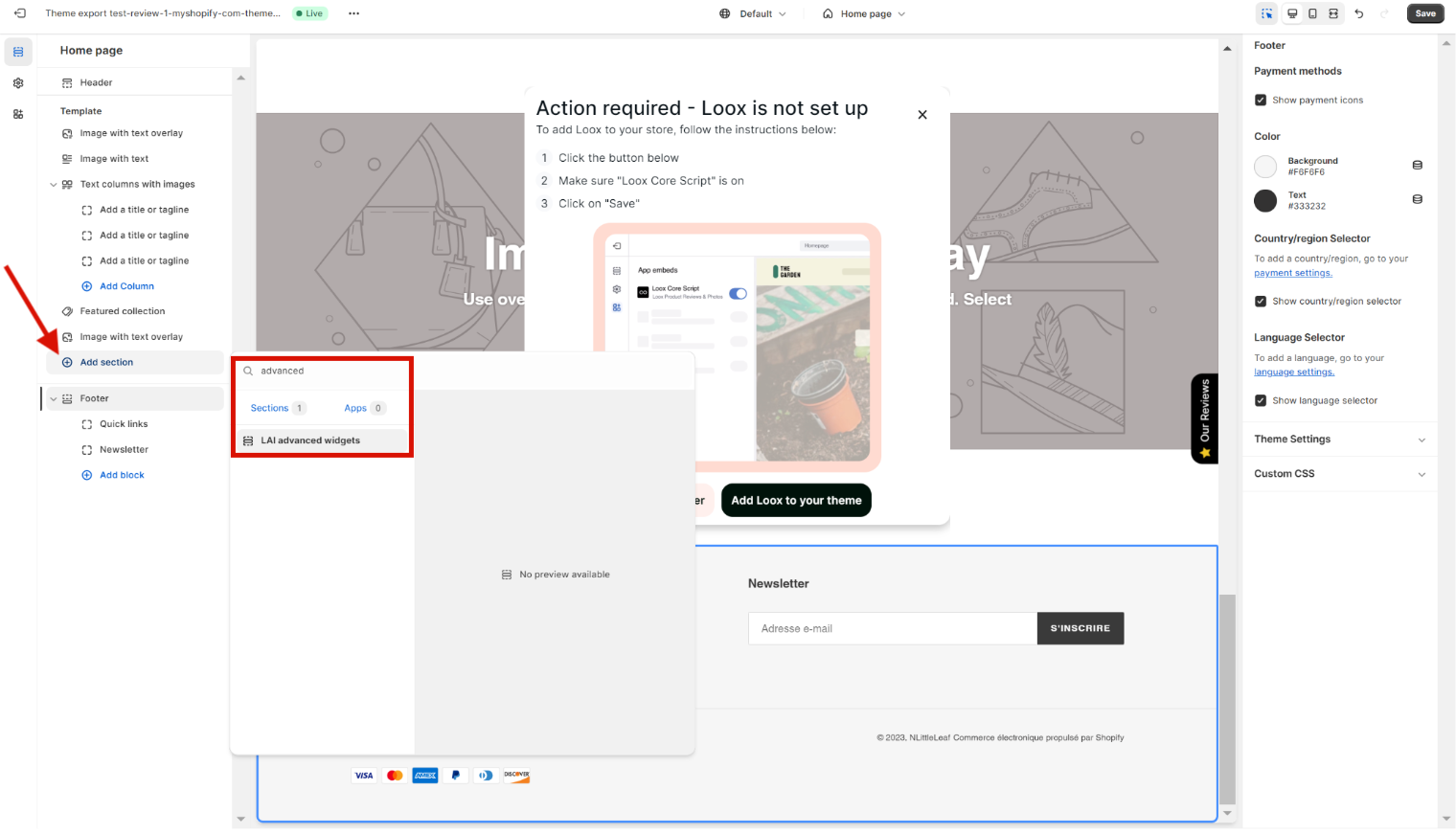
  - Go to **Shopify theme editor** > click on **Add section** > search for **advanced** > add **LAI advanced widgets** and follow [this guideline](https://laireviews.io/docs/settings/display/advanced-widgets) for more details. 
    ![](https://laireviews.io/assets/images/theme-app-extension-8-3e0acf95db20d2b338ac6cdcb7e8de87.png)

### How to add LAI Advanced widgets to other pages

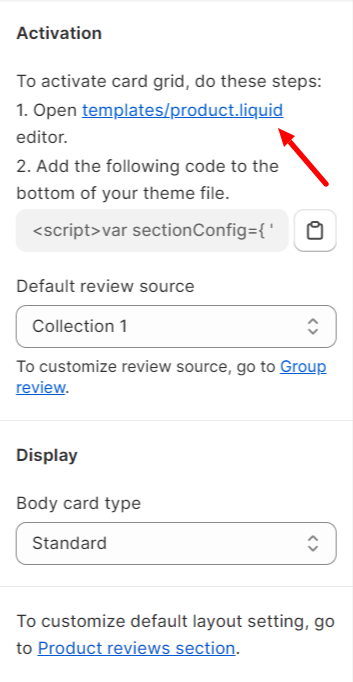
||| The file mentioned in our app just helps you add widgets to product pages.

||| ![](https://laireviews.io/assets/images/advanced-widget-8-aeaf5959cd50359a4e5625c6c4a06fcb.png)
- If you struggle with adding the code, please reach out to us for assistance. 

- Here is the code list: 

    **1. Card carousel**

```
<script>var sectionConfig={ "type_layout" : "cardCarousel", "source" : "default_layout"};</script>{% assign random_number = "now" | date: "%N" | modulo: 1000 | plus: 0 %}<script>var sectionConfig=  (typeof sectionConfig == "undefined" || sectionConfig == null) ? {} : sectionConfig;var scmCustomData= (typeof scmCustomData == "undefined" || scmCustomData == null) ? {} : scmCustomData;var scmCustomDataWigetAll= (typeof scmCustomDataWigetAll == "undefined" || scmCustomDataWigetAll == null) ? [] : scmCustomDataWigetAll; scmCustomDataWigetAll['{{ random_number }}'] ={ "id_iframe" : "{{ random_number }}","productId" : "","typePage" : 'homePage',"sectionConfig" : JSON.stringify(sectionConfig),"scmCustomData" : JSON.stringify(scmCustomData),'dataProduct' : []};sectionConfig= null;scmCustomData= null;</script><div class="scm-container" style="display: none;"><div class="scm-reviews-importer"><iframe class="scm-reviews-importer-iframe" width="100%" title="Sma reviews section Home Page" data-idIframe="{{ random_number }}"></iframe></div></div>
```

    **2. Testimonial carousel**

```
<script>var sectionConfig={ "type_layout" : "testimonial", "source" : "default_layout"};</script>{% assign random_number = "now" | date: "%N" | modulo: 1000 | plus: 0 %}<script>var sectionConfig=  (typeof sectionConfig == "undefined" || sectionConfig == null) ? {} : sectionConfig;var scmCustomData= (typeof scmCustomData == "undefined" || scmCustomData == null) ? {} : scmCustomData;var scmCustomDataWigetAll= (typeof scmCustomDataWigetAll == "undefined" || scmCustomDataWigetAll == null) ? [] : scmCustomDataWigetAll; scmCustomDataWigetAll['{{ random_number }}'] ={ "id_iframe" : "{{ random_number }}","productId" : "","typePage" : 'homePage',"sectionConfig" : JSON.stringify(sectionConfig),"scmCustomData" : JSON.stringify(scmCustomData),'dataProduct' : []};sectionConfig= null;scmCustomData= null;</script><div class="scm-container" style="display: none;"><div class="scm-reviews-importer"><iframe class="scm-reviews-importer-iframe" width="100%" title="Sma reviews section Home Page" data-idIframe="{{ random_number }}"></iframe></div></div>
```

    **3. Media gallery**

```
<script>var sectionConfig={ "type_layout" : "gallery", "source" : "default_layout"};</script>{% assign random_number = "now" | date: "%N" | modulo: 1000 | plus: 0 %}<script>var sectionConfig=  (typeof sectionConfig == "undefined" || sectionConfig == null) ? {} : sectionConfig;var scmCustomData= (typeof scmCustomData == "undefined" || scmCustomData == null) ? {} : scmCustomData;var scmCustomDataWigetAll= (typeof scmCustomDataWigetAll == "undefined" || scmCustomDataWigetAll == null) ? [] : scmCustomDataWigetAll; scmCustomDataWigetAll['{{ random_number }}'] ={ "id_iframe" : "{{ random_number }}","productId" : "","typePage" : 'homePage',"sectionConfig" : JSON.stringify(sectionConfig),"scmCustomData" : JSON.stringify(scmCustomData),'dataProduct' : []};sectionConfig= null;scmCustomData= null;</script><div class="scm-container" style="display: none;"><div class="scm-reviews-importer"><iframe class="scm-reviews-importer-iframe" width="100%" title="Sma reviews section Home Page" data-idIframe="{{ random_number }}"></iframe></div></div>
```

    **4. Card grid**

```
<script>var sectionConfig={ "type_layout" : "grid", "source" : "default_layout"};</script>{% assign random_number = "now" | date: "%N" | modulo: 1000 | plus: 0 %}<script>var sectionConfig=  (typeof sectionConfig == "undefined" || sectionConfig == null) ? {} : sectionConfig;var scmCustomData= (typeof scmCustomData == "undefined" || scmCustomData == null) ? {} : scmCustomData;var scmCustomDataWigetAll= (typeof scmCustomDataWigetAll == "undefined" || scmCustomDataWigetAll == null) ? [] : scmCustomDataWigetAll; scmCustomDataWigetAll['{{ random_number }}'] ={ "id_iframe" : "{{ random_number }}","productId" : "","typePage" : 'homePage',"sectionConfig" : JSON.stringify(sectionConfig),"scmCustomData" : JSON.stringify(scmCustomData),'dataProduct' : []};sectionConfig= null;scmCustomData= null;</script><div class="scm-container" style="display: none;"><div class="scm-reviews-importer"><iframe class="scm-reviews-importer-iframe" width="100%" title="Sma reviews section Home Page" data-idIframe="{{ random_number }}"></iframe></div></div>
```

- - **Default review source**: please visit [this link](https://laireviews.io/docs/settings/widgets/advanced-widgets#select-a-review-source) for more details. 

If you need any help with the advanced widgets, please contact us via live chat or send emails to support@smartifyapps.com.