> ## Knowledge Base Index
> Fetch the complete knowledge base index at: https://lai.crisp.help/sitemap.xml
> Use this file to discover available pages before exploring further.
> Pure-Markdown content can be obtained by appending a '.md' suffix to the content URLs listed in the sitemap (without the trailing slash).

# Integrate with Gempages

> GemPages is a drag & drop page builder on Shopify that creates high-converting, code-free pages with an all-in-one tool.

## Install two apps

- Be assured that the 2 apps have been installed:‌

[Install GemPages Page Builder](https://gempages.net)

[Install LAI Product Reviews ](https://apps.shopify.com/lai-reviews?utm_source=docs&utm_medium=website&utm_campaign=laiwebsite&utm_content=gempages)

## Method 1: Add LAI elements

### Step 1: Enable **LAI Product Reviews

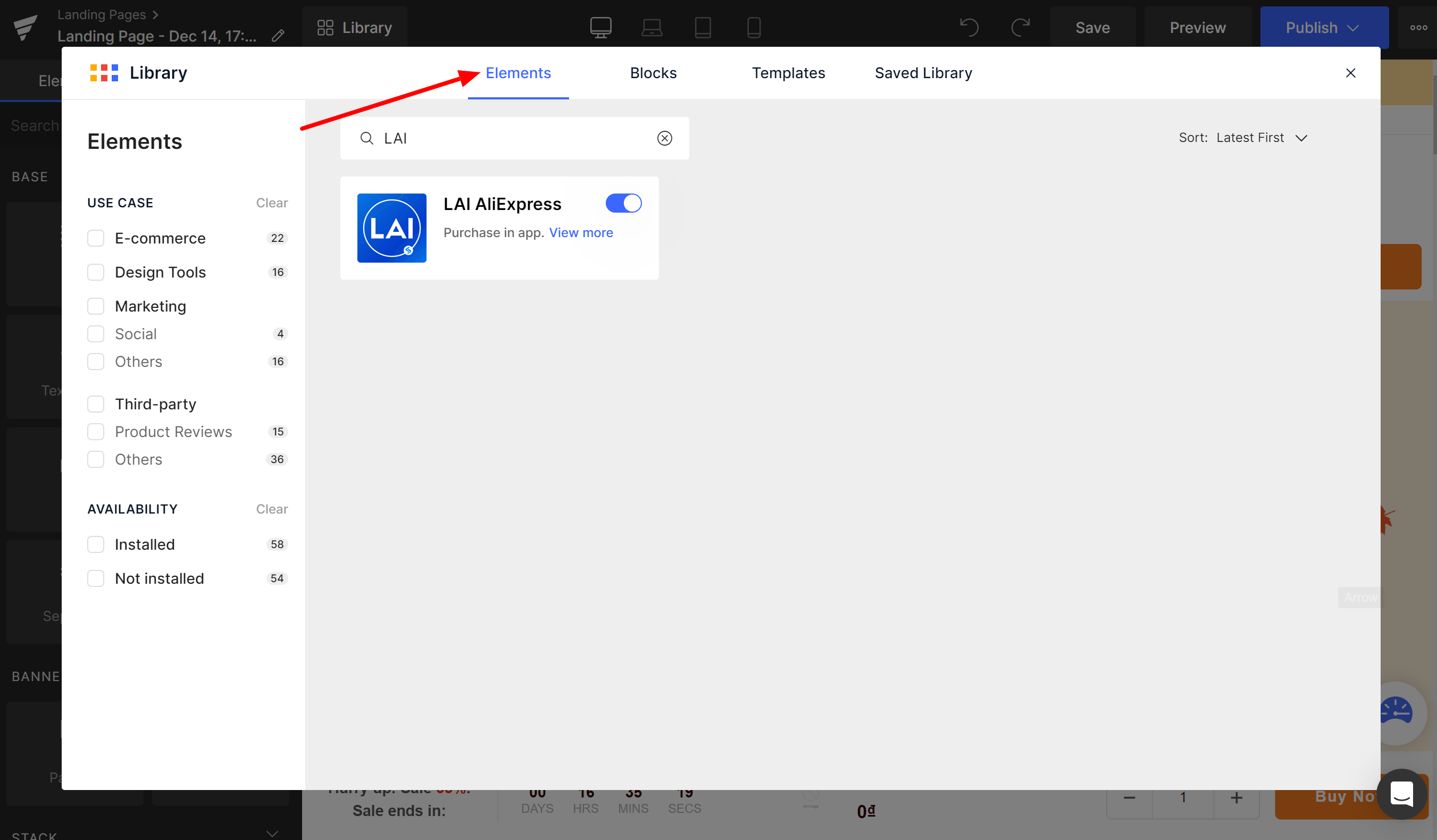
- Click on **Library** > select **Elements** > search for **LAI Product Reviews** > turn on the app. 
![](https://laireviews.io/assets/images/gempages-1-ecbc70fbbe20702e845c931b88319536.png)

**Step 1: **Add this extension to your chrome: [LAI Reviews](https://chrome.google.com/webstore/detail/lai-reviews/cgjdoogakiemolfnpmmggijdnpghklab)

### Step 2: Choose an element

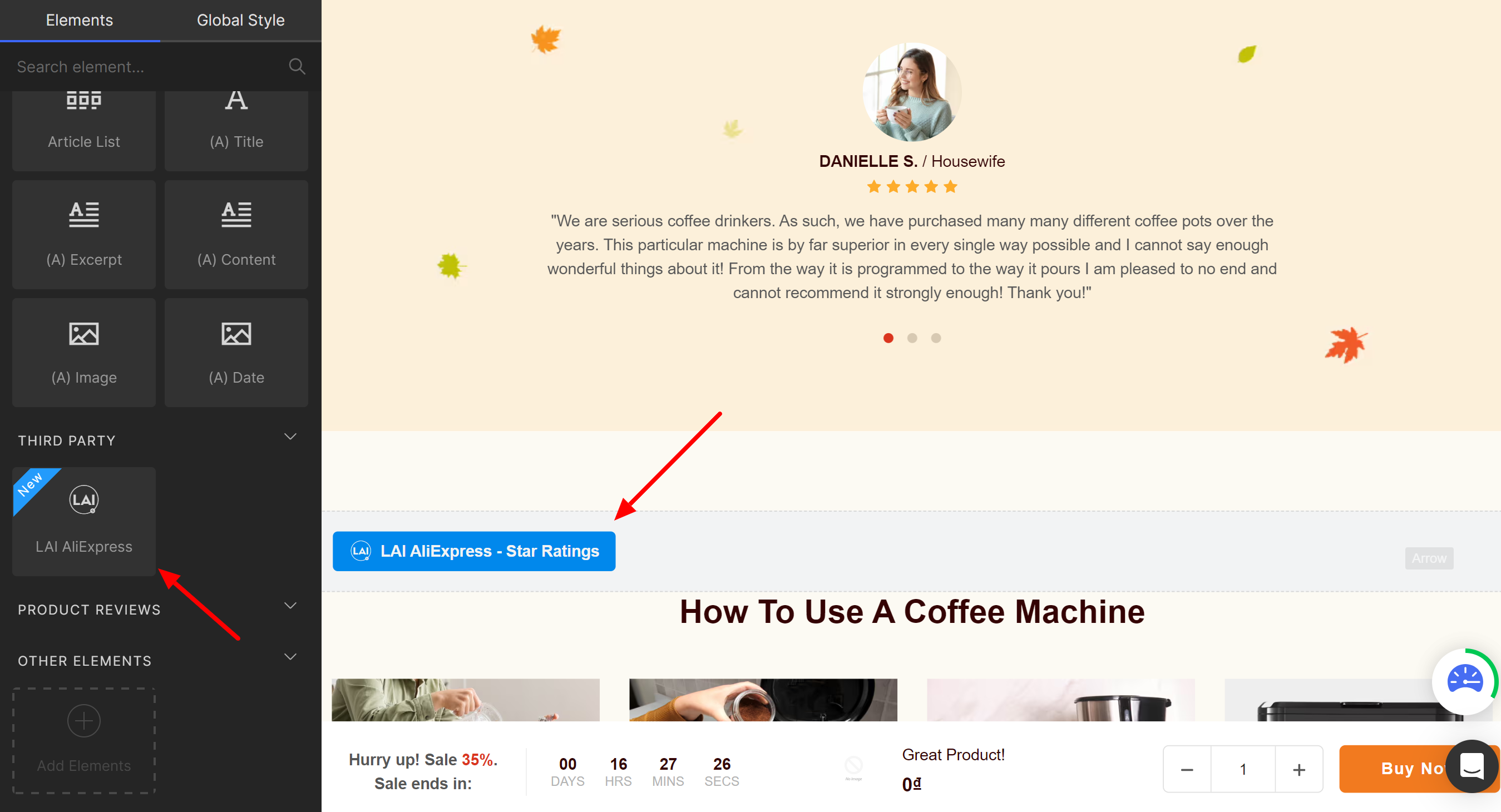
- On the left area, scroll down to the bottom > drag and drop **LAI elements** block to your favorite position on the page.
![](https://laireviews.io/assets/images/gempages-2-659586e90acd1239ba228fcf9f359a01.png)

- **LAI AliExpress - Star ratings** block is added by default. 

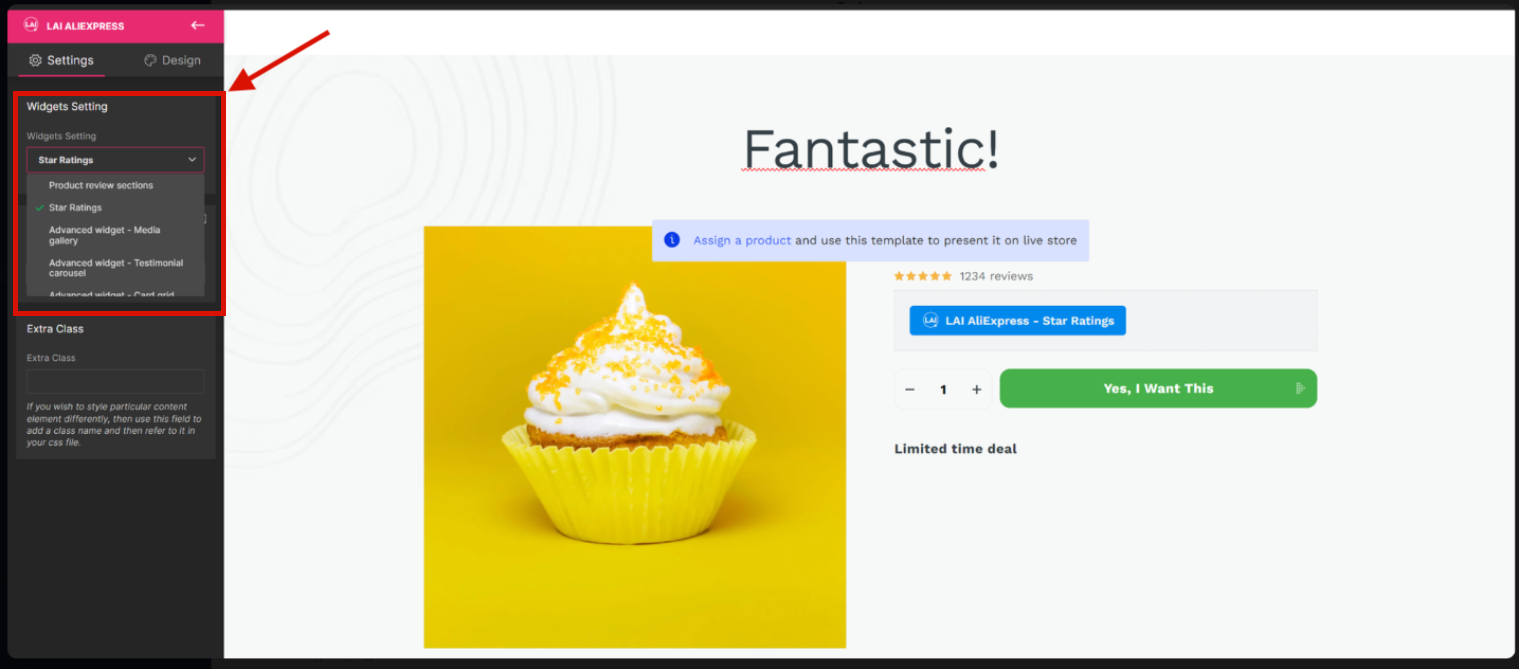
- To show another element, please choose it here:
![](https://laireviews.io/assets/images/gempages-3-9fafb3b43fabb5b9e166e4c845cf687d.png)

### Step 3: Save and publish

- Save and publish the block addition and check it in your online store. 

## Method 2: Add LAI code

### Step 1: Add elements

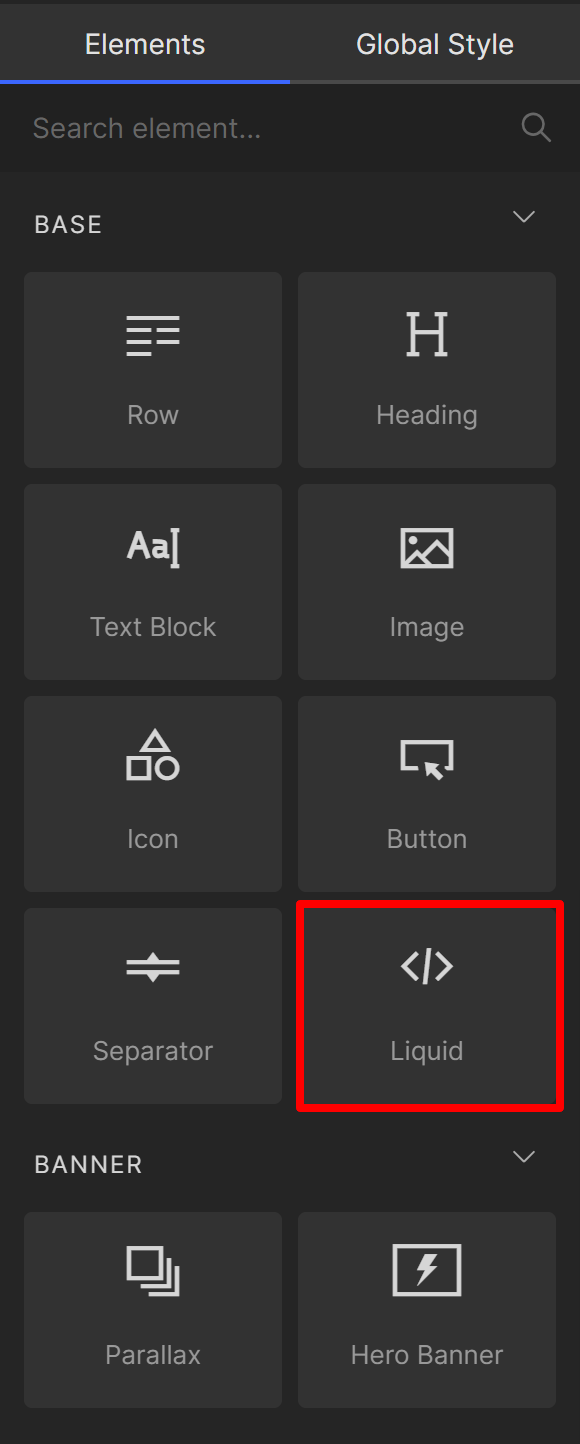
- On the left area, please choose **Liquid** block > drag and drop the block to your favorite position on the page.
![](https://laireviews.io/assets/images/gempages-4-f0b2441d79d5b64a762b8915ab1d0cba.png)

### Step 2: Add LAI code

- Choose a widget you want to add to the position. 

- Click on the pen icon on the right bar.
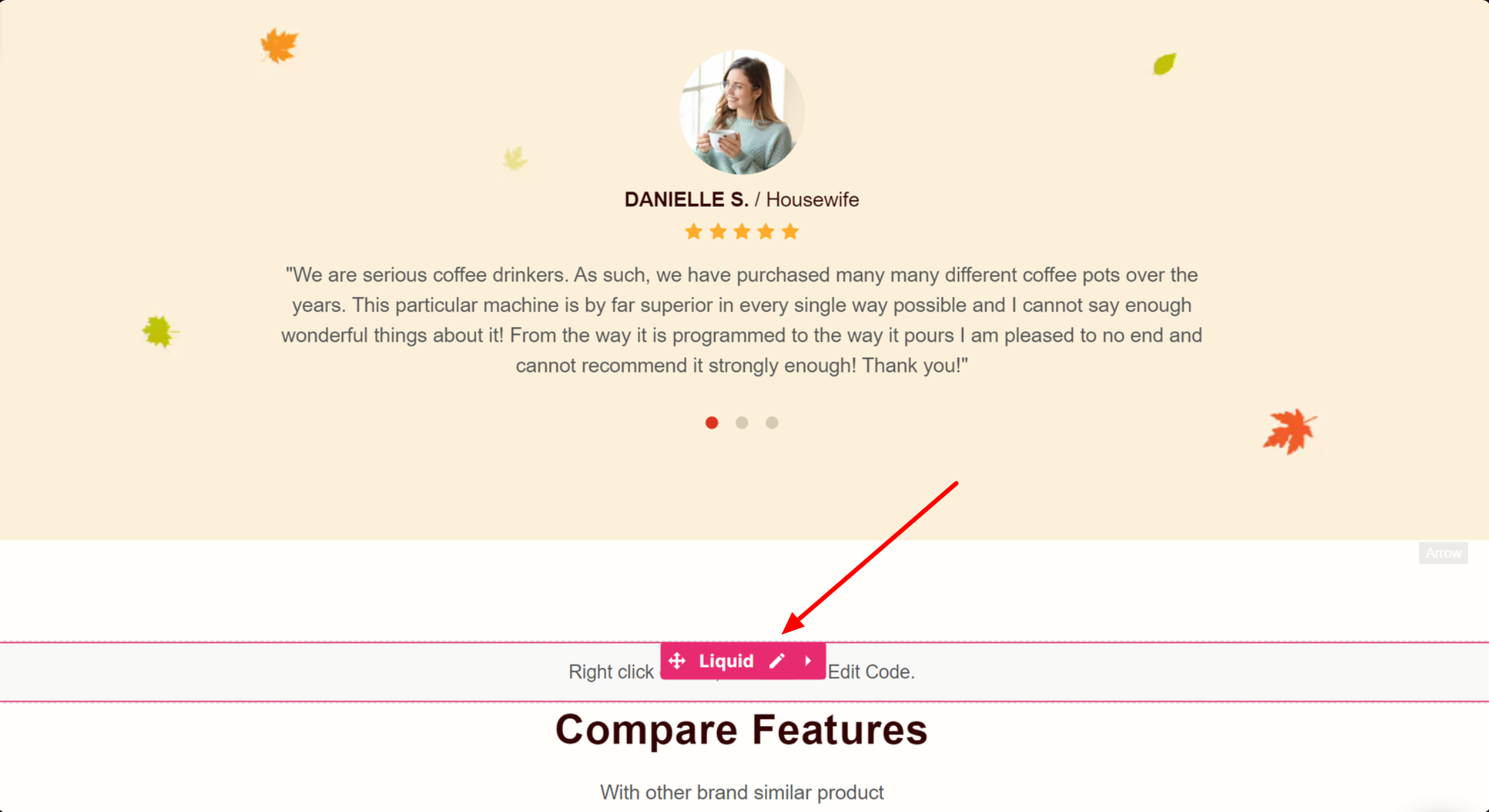
![](https://laireviews.io/assets/images/gempages-5-a13e543568ab57730ef832ab69bc7f96.png)

- Use following LAI code to show widget: 

**1. Product review section**

```
{% assign random_number = "now" | date: "%N" | modulo: 1000 | plus: 0 %}<script>var sectionConfig=  (typeof sectionConfig == "undefined" || sectionConfig == null) ? {} : sectionConfig;var scmCustomData=  (typeof scmCustomData == "undefined" || scmCustomData == null) ? {} : scmCustomData;var scmCustomDataWigetAll= (typeof scmCustomDataWigetAll == "undefined" || scmCustomDataWigetAll == null) ? [] : scmCustomDataWigetAll; scmCustomDataWigetAll['{{ random_number }}'] ={"id_iframe" : "{{ random_number }}","productId" : "{{ product.id }}","typePage" : 'productPage',"sectionConfig" : JSON.stringify(sectionConfig),"scmCustomData" : JSON.stringify(scmCustomData),'dataProduct' : []};sectionConfig= null;scmCustomData= null;scmCustomDataWigetAll['{{ random_number }}'].dataProduct['product']= {{ product | json }};{% for metafieldValue in  product.metafields.scm_review_importer %}scmCustomDataWigetAll['{{ random_number }}'].dataProduct['{{ metafieldValue[0] }}']= `{{ metafieldValue[1] | json }}`;{% endfor %}</script>
<div class="scm-container" style="display: none;">
    <div class="scm-reviews-importer" data-product-id= "{{ product.id }}">
        <iframe class="scm-reviews-importer-iframe" width="100%" title="Sma reviews section Product page" data-idIframe="{{ random_number }}"></iframe>
    </div>
</div>
```

**2. Card carousel**

``` 
<script>var sectionConfig={ "type_layout" : "cardCarousel", "source" : "default_layout"};</script>{% assign random_number = "now" | date: "%N" | modulo: 1000 | plus: 0 %}<script>var sectionConfig=  (typeof sectionConfig == "undefined" || sectionConfig == null) ? {} : sectionConfig;var scmCustomData= (typeof scmCustomData == "undefined" || scmCustomData == null) ? {} : scmCustomData;var scmCustomDataWigetAll= (typeof scmCustomDataWigetAll == "undefined" || scmCustomDataWigetAll == null) ? [] : scmCustomDataWigetAll; scmCustomDataWigetAll['{{ random_number }}'] ={ "id_iframe" : "{{ random_number }}","productId" : "","typePage" : 'homePage',"sectionConfig" : JSON.stringify(sectionConfig),"scmCustomData" : JSON.stringify(scmCustomData),'dataProduct' : []};sectionConfig= null;scmCustomData= null;</script><div class="scm-container" style="display: none;"><div class="scm-reviews-importer"><iframe class="scm-reviews-importer-iframe" width="100%" title="Sma reviews section Home Page" data-idIframe="{{ random_number }}"></iframe></div></div>
```

**3. Testimonial carousel**

```
<script>var sectionConfig={ "type_layout" : "testimonial", "source" : "default_layout"};</script>{% assign random_number = "now" | date: "%N" | modulo: 1000 | plus: 0 %}<script>var sectionConfig=  (typeof sectionConfig == "undefined" || sectionConfig == null) ? {} : sectionConfig;var scmCustomData= (typeof scmCustomData == "undefined" || scmCustomData == null) ? {} : scmCustomData;var scmCustomDataWigetAll= (typeof scmCustomDataWigetAll == "undefined" || scmCustomDataWigetAll == null) ? [] : scmCustomDataWigetAll; scmCustomDataWigetAll['{{ random_number }}'] ={ "id_iframe" : "{{ random_number }}","productId" : "","typePage" : 'homePage',"sectionConfig" : JSON.stringify(sectionConfig),"scmCustomData" : JSON.stringify(scmCustomData),'dataProduct' : []};sectionConfig= null;scmCustomData= null;</script><div class="scm-container" style="display: none;"><div class="scm-reviews-importer"><iframe class="scm-reviews-importer-iframe" width="100%" title="Sma reviews section Home Page" data-idIframe="{{ random_number }}"></iframe></div></div>
```

**4. Media gallery**

```
<script>var sectionConfig={ "type_layout" : "gallery", "source" : "default_layout"};</script>{% assign random_number = "now" | date: "%N" | modulo: 1000 | plus: 0 %}<script>var sectionConfig=  (typeof sectionConfig == "undefined" || sectionConfig == null) ? {} : sectionConfig;var scmCustomData= (typeof scmCustomData == "undefined" || scmCustomData == null) ? {} : scmCustomData;var scmCustomDataWigetAll= (typeof scmCustomDataWigetAll == "undefined" || scmCustomDataWigetAll == null) ? [] : scmCustomDataWigetAll; scmCustomDataWigetAll['{{ random_number }}'] ={ "id_iframe" : "{{ random_number }}","productId" : "","typePage" : 'homePage',"sectionConfig" : JSON.stringify(sectionConfig),"scmCustomData" : JSON.stringify(scmCustomData),'dataProduct' : []};sectionConfig= null;scmCustomData= null;</script><div class="scm-container" style="display: none;"><div class="scm-reviews-importer"><iframe class="scm-reviews-importer-iframe" width="100%" title="Sma reviews section Home Page" data-idIframe="{{ random_number }}"></iframe></div></div>
``` 

**5. Card grid**

```
<script>var sectionConfig={ "type_layout" : "grid", "source" : "default_layout"};</script>{% assign random_number = "now" | date: "%N" | modulo: 1000 | plus: 0 %}<script>var sectionConfig=  (typeof sectionConfig == "undefined" || sectionConfig == null) ? {} : sectionConfig;var scmCustomData= (typeof scmCustomData == "undefined" || scmCustomData == null) ? {} : scmCustomData;var scmCustomDataWigetAll= (typeof scmCustomDataWigetAll == "undefined" || scmCustomDataWigetAll == null) ? [] : scmCustomDataWigetAll; scmCustomDataWigetAll['{{ random_number }}'] ={ "id_iframe" : "{{ random_number }}","productId" : "","typePage" : 'homePage',"sectionConfig" : JSON.stringify(sectionConfig),"scmCustomData" : JSON.stringify(scmCustomData),'dataProduct' : []};sectionConfig= null;scmCustomData= null;</script><div class="scm-container" style="display: none;"><div class="scm-reviews-importer"><iframe class="scm-reviews-importer-iframe" width="100%" title="Sma reviews section Home Page" data-idIframe="{{ random_number }}"></iframe></div></div>
```

**6. Star ratings**

```
<div class="scm-reviews-rate" data-rate-version2="{{ product.metafields.scm_review_importer.reviewsData.reviewCountInfo | json }}" data-product-id="{{ product.id }}"></div>
```

||| Each piece of code is just added to one Liquid block.

- For example, if you want to add LAI Product review section block:
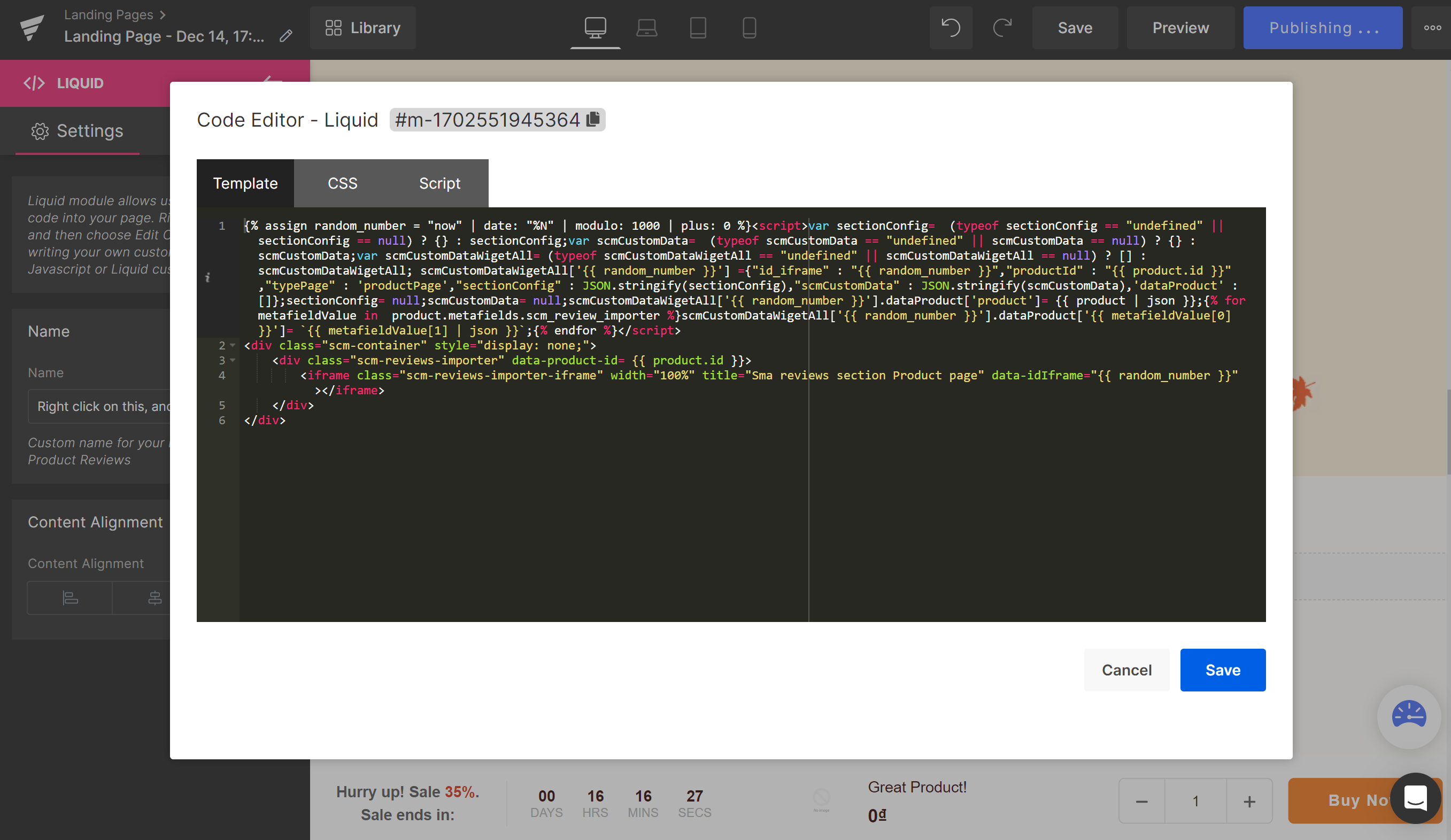
![](https://laireviews.io/assets/images/gempages-6-0ea8f7ec7d9d2bcfd58281d447def259.png)

### Step 3: Save and publish

- Save and publish the block addition and check it in your online store. 

If you have any problem, please contact us via **live chat** or drop us an emails to **support@smartifyapps.com**. We are more than happy to assist you.